JavaScript is not currently enabled, but is required for full CodeSonar manual search and browse functionality.
If you are viewing this file in your hub's Web GUI, enable JavaScript in your browser: you will also need it for GUI functionality.
If you opened this file directly from disk, your browser may be directly suppressing JavaScript functionality: certain browsers perform this suppression on local files (but not files delivered by web servers) for security reasons.
| CodeSonar® 9.0p0 Hot Tips | CONFIDENTIAL | CodeSecure Inc |
CodeSonar stores and reports various information about analyzed procedures.
CodeSonar stores the following information about each procedure.
| Name ( Search Language Field Name, if any) |
Description | ||||||||
|---|---|---|---|---|---|---|---|---|---|
| Procedure ( procedure) |
The procedure name, as computed by cs_pdg_friendly_name(). | ||||||||
| Procedure File |
The source file in which the
procedure is defined. The GUI and procedure
search language provide direct access to several Procedure
File properties:
|
||||||||
| Procedure Line | The line number of the procedure entry point in Procedure File. | ||||||||
| Procedure-Granularity Metrics | |||||||||
The CodeSonar analysis computes procedure-granularity metrics,
and stores them with other procedure information in the project
analysis directory.
|
|||||||||
Procedure information is available in the CodeSonar GUI as follows.
| Analysis Procedures | Each entry in the Procedures table contains information about an analyzed procedure. |
|---|---|
| Metric Report | Displays procedure-granularity metrics as specified for the report. |
| Procedure Search Results | Displays the result of a search in the procedure domain. |
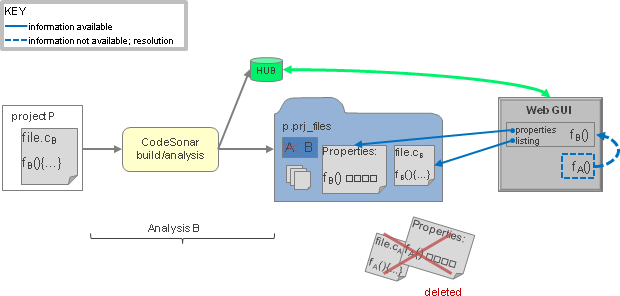
When a source file is analyzed, file properties are submitted to the hub and stored with the rest of the analysis information. For space reasons, the file listing is not submitted to the hub, but is instead stored in the project analysis directory ( pfilesname.prj_files/). For full details, see Source Files: Availability.
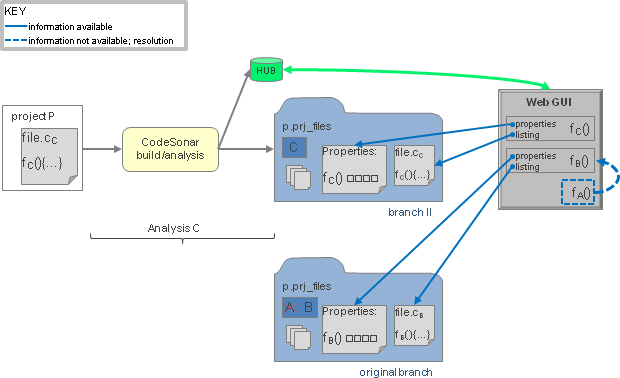
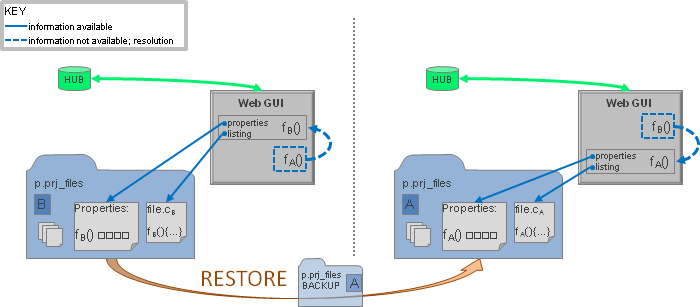
Procedure properties for the procedures defined in the source file are also stored in the project analysis directory, again for space reasons. The analysis will remove any procedure information previously stored in the project analysis directory before storing the new information.
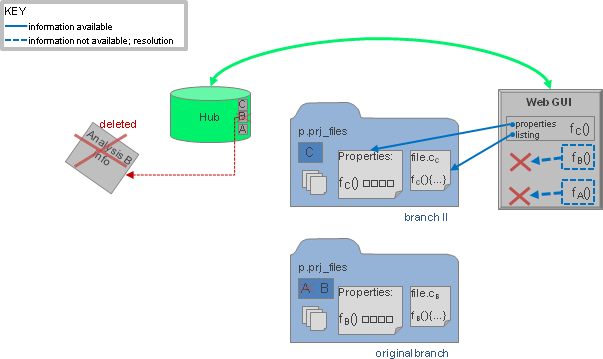
The project analysis directory is thus the only location storing any information about an analyzed procedure: neither the procedure listing nor the procedure properties are recorded on the hub.
When an analysis A is local-managed, its build directory and analysis directory are the same directory. If there is a subsequent analysis B with the same build/analysis directory, the previous files will be overwritten and the hub will only be able to interact with procedure information for analysis B.
When an analysis A is remote-managed, its analysis directory is
always unique and cannot be affected by future analyses. When such an
analysis transitions to daemon mode, the hub will be able to interact
with the procedure information for analysis A even if there have been
subsequent analyses of the same project.
If you want to take advantage of this behavior, specify the -remote or -remote-archive option in your build/analysis
command.
The remainder of this page details various scenarios for local-managed analysis information.
The remainder of this page details various scenarios for
local-managed analysis information.
These scenarios are not applicable for remote-managed analyses
(including those that are remote-managed only after transition to
daemon mode),
because each remote-managed analysis has its own distinct analysis
directory and so its files are always available unless the analysis
is deleted from the hub.