
JavaScript is not currently enabled, but is required for full CodeSonar manual search and browse functionality.
If you are viewing this file in your hub's Web GUI, enable JavaScript in your browser: you will also need it for GUI functionality.
If you opened this file directly from disk, your browser may be directly suppressing JavaScript functionality: certain browsers perform this suppression on local files (but not files delivered by web servers) for security reasons.
| CodeSonar® 9.0p0 Hot Tips | CONFIDENTIAL | CodeSecure Inc |
Under role-based access control (RBAC), each user is assigned one or more roles, each of which holds some number of role-permissions. The set of permissions that apply to a user is then the set of all permissions held by at least one of the user's roles.
Roles are securable resources.
This page describes the use of roles in CodeSonar, including the special built-in roles.
Under role-based access control (RBAC), each user is assigned one or more roles, each of which holds some number of role-permissions. The set of permissions that apply to a user is then the set of all permissions held by at least one of the user's roles.
A role corresponds to the notion of a type of user, and captures the intuition that users of the same type will have the same degree of access to CodeSonar information and functionality. In general, the number of roles on a hub will be much lower than the number of users.
When you start a new hub, it will be set up with four built-in roles. You can modify these roles to various extents; you can also define as many new roles as you wish.
Each role can have any number of parent roles (including zero), and can be the parent of any number of other roles (including zero). A role may be directly assigned any number of role-permissions, and will also inherit the role-permissions of all its parents.
The remainder of this subsection uses an illustrated example to describe role inheritance in detail.
The following diagram shows one way that a set of roles {A, B, C, D, E, F, G} might be interrelated. Note in particular that there is no requirement that the roles all belong to a single overall hierarchy.
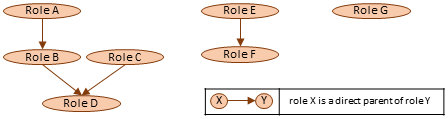
For the remainder of this discussion, we will concentrate on the example role hierarchy that contains roles {A, B, C, D}.
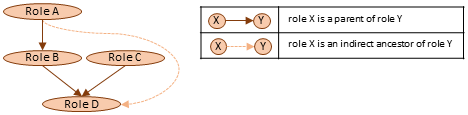
We say that:
The Role Ancestors page shows a role's parent roles and its indirect ancestor roles.
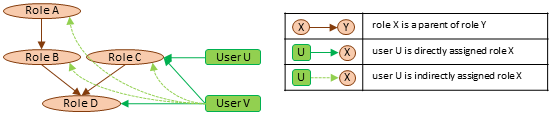
We say that a user who is directly assigned a role R is indirectly assigned all the roles that are ancestors of R.
We introduce two users to the example.
The User Roles and Role Users pages show the user/role mapping from different perspectives. User Roles shows a user's directly and indirectly assigned roles; Role Users shows the directly and indirectly assigned users for a particular role.
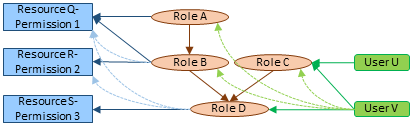
We introduce three resource-permissions to the example: Q-1 (denoting permission 1 on resource Q), R-2, and S-3. To avoid cluttering the example with resource-inheritance relationships, we stipulate that all three involve resources of independent type, so can only be directly assigned or role-inherited.
The Global Role-Permissions page and Resource Role Permissions pages show both direct and and indirect permissions for each role.

The full picture is therefore as follows.
One of the assigned roles for each user is designated the default role for that user. A user's default role is used to establish the initial role-permission assignments for new independent resources created by that user.
To set the default role...
CodeSonar ships with five roles: Administrator, Manager, Anyone, Enabled, and User. Of these, Administrator, Anyone, and Enabled have special protections: they cannot be deleted or renamed.
Each of these roles is assigned a set of default role-permissions when a new hub is created. These assignments can be adjusted subsequently, except that the immutable role-permissions for each role cannot be removed.
| Administrator |
Provides full access to hub administration functionality and to
all analysis results.
|
| Manager |
Provides access to some hub administration functionality, but
is not as powerful as Administrator.
|
| Anyone |
By default, provides almost no permissions.
|
| Enabled |
Grants the ability to sign in.
You can use the Enabled role to manage user activation and deactivation.
For maximum simplicity in enabling and disabling users, we recommend that you do not modify the Enabled role, and that you do not assign G_SIGN_IN permission to any other role. |
| User |
By default, provides read and write access to analysis
information and a subset of hub administration information;
grants the ability to create a new account.
|
Roles have the following properties.
| Role Name | A short descriptive name for the role. Can be modified from the Role Ancestors and Role Users pages (if permitted for the role). |
|---|---|
| Role Description | A user-specified string containing a description of the role. Can be modified from the Role Ancestors and Role Users pages. |
| Role ID | A unique numeric identifier for the role. Cannot be modified. |
Roles are securable resources, with access controlled by the ROLE_* permissions. It is therefore possible to grant permission to edit role-permission and user assignments for individual roles, without needing to assign the G_ADMINISTER_USERS permission.
For example, suppose a hub has a project called ProjectA, with a role called ProjA that provides access to ProjectA and is assigned to all users who are working on that project. To delegate assignment/unassignment of the ProjA role to someone who does not have the special Administrator role, an administrator might create a new role called ProjAManager and assign it permission ROLE_ASSIGN for ProjA. When a new user starts working on ProjectA, anyone with the ProjAManager role can assign them the ProjA role without needing to go through a hub administrator. Similarly, if a user stops working on Project A, anyone with the ProjAManager role can remove ProjA from the user's set of assigned roles.
CodeSonar provides the following operations on roles.
| Operation | Links |
|---|---|
| Add a new role. | GUI Reference:
Roles Task: Grant Select Users Access to a Project |
| Delete a role. | GUI Reference:
Roles GUI Reference: Role Users GUI Reference: Role Ancestors |
| Change a user's default role. | GUI Reference: Account Editor |
| Change a user's role set [*] |
GUI Reference: User
Roles Task: Modify a User's Roles Authentication plug-ins can be configured to update a user's role set each time they sign in:
|
| Change a role's user set [*] | GUI Reference: Role
Users Task: Grant Select Users Access to a Project |
| View role information; edit its name and description. | GUI Reference: Role
Users GUI Reference: Role Ancestors Task: Grant Select Users Access to a Project |
| Adjust a role's parent set. | GUI Reference: Role Ancestors |
| Adjust a role's permission set. | GUI
Reference: Global Role-Permissions GUI Reference: Resource Role-Permissions Task: Grant Select Users Access to a Project Task: Modify a Role's Permissions |
[*] "Changing a user's role set" and "changing a role's user set" represent two perspectives on the same underlying operation: changing the mapping between users and roles. Similarly, the Role Users and User Roles page types provide dual views of that mapping. You can use either page type to change user/role assignments: in general, choose Role Users if you are focused on a particular role and User Roles if you are focused on a particular user.