
JavaScript is not currently enabled, but is required for full CodeSonar manual search and browse functionality.
If you are viewing this file in your hub's Web GUI, enable JavaScript in your browser: you will also need it for GUI functionality.
If you opened this file directly from disk, your browser may be directly suppressing JavaScript functionality: certain browsers perform this suppression on local files (but not files delivered by web servers) for security reasons.
| CodeSonar® 9.0p0 Hot Tips | CONFIDENTIAL | CodeSecure Inc |
Pages of some types may belong to browse sequences. If so, they will provide links for navigating within the sequence.
Browse sequences are available for all analyses, regardless of the language or languages involved.
Important Note: the CodeSonar Web GUI makes extensive use of JavaScript. Make sure JavaScript is enabled in your web browser.
Where possible, the CodeSonar GUI will provide warning browse sequences. A warning browse sequence facilitates stepping through Warning Reports for the warnings in a recently-viewed table without needing to navigate back and forth to the table. Similarly, the GUI will provide file browse sequences that facilitate stepping through Source Listings.
A Warning Report will belong to a warning browse sequence if one of the following is true.
Warning Report pages that belong to a browse sequence will include browse sequence navigation links relative to that sequence.
A Source Listing will belong to a file browse sequence if one of the following is true.
Source Listing pages that belong to a browse sequence will include browse sequence navigation links relative to that sequence.
We use the following general terminology.
| belong to a browse sequence |
We say a GUI page belongs to a browse sequence if it is:
|
|---|---|
| establishing page | The establishing page for a browse sequence is the Analysis tab or search results page containing the table of warning or file instances on which the sequence is based. |
The following table summarizes the properties of the available browse sequence kinds.
| Browse Sequence Kind | Sequence Page Type | Establishing Page Types |
|---|---|---|
| warning browse sequence | Warning Report | Analysis: Warnings tab; Warning Search Results |
| file browse sequence | Source Listing | Analysis: Files tab; File Search Results |
If a Warning Report belongs to a warning browse sequence (or a Source Listing belongs to a file browse sequence), navigation links for the browse sequence will be displayed in the page heading.
| Page Type | Browse Sequence Navigation Links | ||||||
|---|---|---|---|---|---|---|---|
| Warning Report |
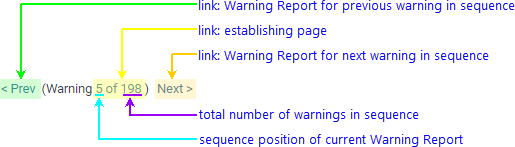
|
||||||
| Source Listing |
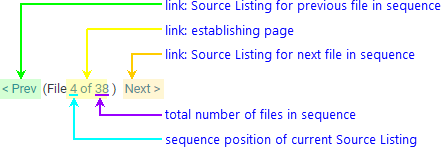
|
Browse sequences are based on the search and sort queries used to construct the establishing page. The results of these queries may change while you are browsing the sequence.
In many cases, the browse sequence can be seamlessly adapted to reflect these changes. If it cannot, CodeSonar will provide a mechanism for reestablishing the browse sequence as described below.
There are two main problems that can affect browse sequences: substantial sequence changes and session loss.
In some cases the browse sequence may undergo changes substantial enough that it cannot be automatically adapted. If this happens, CodeSonar will display a message next to the browse sequence navigation links, including a link to the establishing page for the sequence.
To reestablish the sequence:
User sessions can be lost in various ways, including the following.
If a user session is lost, browse sequence information associated with that session will also be lost. CodeSonar will display an error message indicating that it could not maintain the browse sequence, but will generally not be able to provide a link to the establishing page. However, the establishing page may still be available in your web browser history.
To reestablish the sequence: