
General

GUI Reference: Logs: Parse Details Log

A Parse Details Log page contains detailed information about the CodeSonar parse of a single compilation unit.

Parse details logs are only available when configuration parameters SEND_HOOK_LOG_TO_HUB and SEND_PARSE_LOG_TO_HUB are both set to Yes.


Navigating To

From Parse Log In the log entry for the compiler invocation of interest, click the compilation unit name in the main part of the entry.
From Source Listing Open the File Details section and click the file path link on the Compilation Unit line.

Parse details logs are only sent to the hub when configuration parameters SEND_HOOK_LOG_TO_HUB and SEND_PARSE_LOG_TO_HUB are both set to Yes. If one or both of these is set to No for a particular analysis, Parse Details Log pages will not be available for that analysis and the links described above will not be provided.

Page Properties

Output formats XML (log_fe_details.xsd), text
Visibility Filter Applied none
RBAC Permissions Needed
Page AccessANALYSIS_READ

Contents and Usage

The following annotated screenshot shows the various parts of a Parse Details Log page.
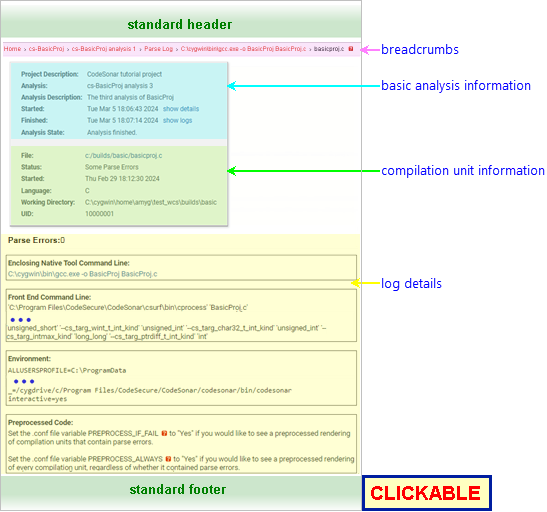
Annotated Screenshot: Parse Details Log Page standard header breadcrumbs basic analysis information compilation unit information log details standard footer

Standard Header See GUI Reference: Standard Header.
Breadcrumbs Home > [Other_ProjectTree_Ancestors >] Project_Name > Analysis_Name > Parse Log > Command_Line > fname
where
  • Home links to the GUI Home page.
  • Together with the Home link (corresponding to the root project tree), Other_ProjectTree_Ancestors represents the project tree ancestors of the analyzed project as a >-separated sequence of project tree names. Each name links to the corresponding Project Tree page.
  • Project_Name is the name of the analyzed project, and links to the corresponding Project page.
  • Analysis_Name is the value of the Analysis property for this analysis, and links to the corresponding Analysis page.
  • Parse Log links to the Parse Log page for this analysis.
  • Command_Line is the native command line that generated the compilation unit, and links to the corresponding Native Compilation Details Log page.
  • fname is the basename of the file at the root of the compilation unit include tree.
Page Heading The Parse Details Log page has no heading.
Basic Analysis Information A table of basic information about the analysis:
Project Description (if any) for the project analyzed.
Analysis  
Analysis Description (if any)
Started click show details to view the analysis Username, Machine, and Address.

screenshot fragment: show details expansion

Finished click show logs for links to the analysis Build Log, CodeSonar Parse Log, and CodeSonar Analysis Log.

screenshot fragment: show logs expansion

If logs for this analysis have been deleted, a "logs have been deleted" notification will be displayed instead of the table of links. (Logs can be deleted from the Analysis page.)
Analysis State A progress bar whose border is black for base analyses, gray for incremental analyses. States "Analysis finished" if the CodeSonar analysis has completed.
Compilation Unit Information A table of information about the compilation unit:
File The Path for the file instance at the root of the compilation unit.
Status The status of CodeSonar's attempt to parse the file: one of Running, Crashed, Failed, Invalid, Finished OK, Obsoleted, Missing in Action. Status Obsoleted indicates that the file was compiled two or more times and the current instance is not the most recent. Status Missing in Action indicates that CodeSonar believes the compilation process is no longer running, but does not know what happened to it.
Started The date and time at which CodeSonar started parsing the compilation unit.
Language For the file instance at the root of the compilation unit.
Working Directory The directory where the user's compiler ran when it parsed the compilation unit.
IR Directory The directory in which CodeSonar stored the internal representation of this compilation unit.
UID A unique identifier for the compilation unit.
If logs for this analysis have been deleted, a deletion notification will be displayed instead of this and the Log Details.
Log Details Details about the CodeSonar parse of the compilation unit, in four sections:
  • Enclosing Native Tool Command Line: the hooked command line that generated the compilation unit. Links to the Native Compilation Details Log for the command line.
  • Front End Command Line: the full command line used by the CodeSonar front end to parse the compilation unit.
  • Environment: a full listing of the environment settings for the hooked command line.
  • Preprocessed Code: depends on the settings of configuration file parameters PREPROCESS_IF_FAIL and PREPROCESS_ALWAYS, and on the compilation unit Status.
    • If the status is Running, and in some circumstances if the Status is Crashed, this section will contain a note about the PREPROCESS_IF_FAIL and PREPROCESS_ALWAYS parameters.
    • Otherwise, if PREPROCESS_ALWAYS=Yes, this section will contain a rendering of the compilation unit.
    • Otherwise, if PREPROCESS_FAIL=Yes and CodeSonar encountered parse errors on this compilation unit, this section will contain a rendering of the compilation unit.
    • Otherwise, this section will contain a note about the PREPROCESS_IF_FAIL and PREPROCESS_ALWAYS parameters.
Standard Footer See GUI Reference: Standard Footer.

Navigating From

view the analysis build or analysis log or see a different view of the parse log Click show logs, then select the desired log and view from the list of links.
view the native compilation details log corresponding to this compilation unit Click the command line link in the breadcrumbs, or in the Enclosing Native Tool Command Line section of the log details.

