
JavaScript is not currently enabled, but is required for full CodeSonar manual search and browse functionality.
If you are viewing this file in your hub's Web GUI, enable JavaScript in your browser: you will also need it for GUI functionality.
If you opened this file directly from disk, your browser may be directly suppressing JavaScript functionality: certain browsers perform this suppression on local files (but not files delivered by web servers) for security reasons.
| CodeSonar® 9.0p0 Hot Tips | CONFIDENTIAL | CodeSecure Inc |
Displays the results of project searches.
Projects in the list of search results can involve any language or languages, provided the projects satisfy the search constraints.
For the results of searches in other domains, see Search Results.
Important Note: the CodeSonar Web GUI makes extensive use of JavaScript. Make sure JavaScript is enabled in your web browser.
The Project Search Results page can be reached in any of the following ways.
| From Advanced Search: | Issue a search in the Projects tab |
|---|---|
| From Home: | Issue a search using the simple search tool. |
| From Saved Searches: | Click on a line in the Projects tab. |
| Output formats | CSV, XML (project_search.xsd) | ||||
|---|---|---|---|---|---|
| Visibility Filter Applied | Visible Projects | ||||
| RBAC Permissions Needed |
|
The following annotated screenshot shows the various parts of a Project Search Results page.
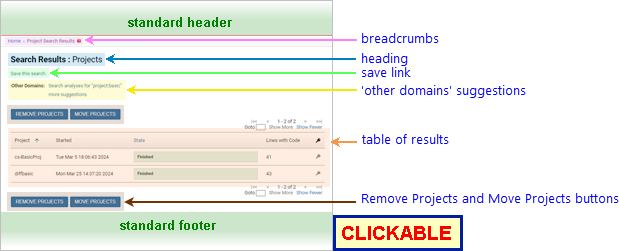
| Standard Header | See GUI Reference: Standard Header. | ||||||||||||||||||||||||||||||||||||||||||||||||||||||||||||||||
|---|---|---|---|---|---|---|---|---|---|---|---|---|---|---|---|---|---|---|---|---|---|---|---|---|---|---|---|---|---|---|---|---|---|---|---|---|---|---|---|---|---|---|---|---|---|---|---|---|---|---|---|---|---|---|---|---|---|---|---|---|---|---|---|---|---|
| Breadcrumbs | Home > Project Search Results where Home links to the GUI Home page |
||||||||||||||||||||||||||||||||||||||||||||||||||||||||||||||||
| Page Heading | Search Results : Projects | ||||||||||||||||||||||||||||||||||||||||||||||||||||||||||||||||
| Save link |
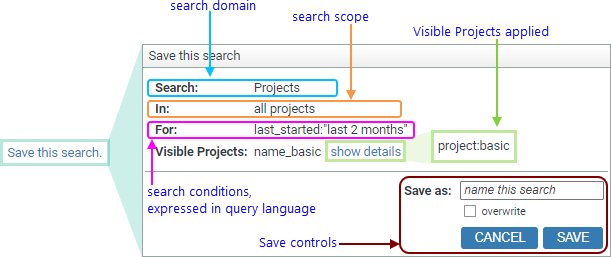
Expands to provide functionality for saving the current search.
See Save a Search for full details.
Saved project searches are available (subject to NAMEDSEARCH_EXISTS permissions) in several GUI locations:
|
||||||||||||||||||||||||||||||||||||||||||||||||||||||||||||||||
| 'Other Domains' suggestions |
Shortcut links to execute the same query in different domains.
|
||||||||||||||||||||||||||||||||||||||||||||||||||||||||||||||||
| Table of results |
A table describing all projects that match the search
conditions.
|
||||||||||||||||||||||||||||||||||||||||||||||||||||||||||||||||
| Remove Projects button | Click to remove one or more of the projects. This button is available above and below the Project search results table. See Task: Delete Multiple Projects or Project Trees (or both) for detailed instructions | ||||||||||||||||||||||||||||||||||||||||||||||||||||||||||||||||
| Move Projects button | Click to move one or more of the projects to a different parent project tree. This button is available above and below the Project search results table. See Task: Move Multiple Projects or Project Trees (or both) for detailed instructions. | ||||||||||||||||||||||||||||||||||||||||||||||||||||||||||||||||
| Standard Footer | See GUI Reference: Standard Footer. | ||||||||||||||||||||||||||||||||||||||||||||||||||||||||||||||||
See Searching: Saved Searches: Permissions for details of the permissions required to save a named search.
To save a search:
| view more information about a project |
Locate the desired project in the table and click anywhere in
that line.
|
|---|
 *
* to navigate to the corresponding