JavaScript is not currently enabled, but is required for full CodeSonar manual search and browse functionality.
If you are viewing this file in your hub's Web GUI, enable JavaScript in your browser: you will also need it for GUI functionality.
If you opened this file directly from disk, your browser may be directly suppressing JavaScript functionality: certain browsers perform this suppression on local files (but not files delivered by web servers) for security reasons.
| CodeSonar® 9.0p0 Hot Tips | CONFIDENTIAL | CodeSecure Inc |
This page contains information about a single role and its ancestor roles. It provides functionality for adding and removing parent roles.
Important Note: the CodeSonar Web GUI makes extensive use of JavaScript. Make sure JavaScript is enabled in your web browser.
| From Role Users: | Click the Ancestor Roles tab above the table of users. |
|---|---|
| URL | http://hub_location/role/role_id-ancestors.html |
| Output formats | CSV, JSON, XML (role_ancestors.xsd) | ||||
|---|---|---|---|---|---|
| Visibility Filter Applied | none | ||||
| RBAC Permissions Needed |
|
The following annotated screenshot shows the various parts of a Role Ancestors page.
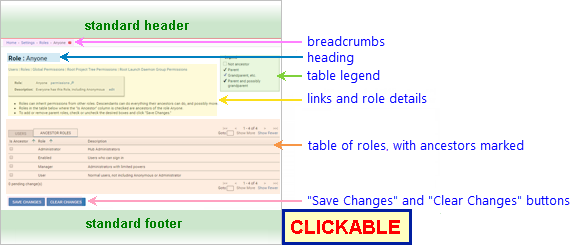
| Standard Header | See GUI Reference: Standard Header. | ||||||||||
|---|---|---|---|---|---|---|---|---|---|---|---|
| Breadcrumbs |
Home > Settings > Roles >
Role_Name Where
|
||||||||||
| Page Heading | Role : Role_Name | ||||||||||
| Links | Links to other RBAC-related pages: Users, Roles, Global Role-Permissions, Root Project Tree Permissions, Root Launch Daemon Group Permissions. The latter two links are to the Resource Role-Permissions pages for the root project tree and root launchd group, respectively. | ||||||||||
| Role Details |
Information about the role described on this page.
|
||||||||||
| Role Table |
A table with one row for each other role on the hub.
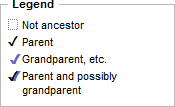
The available table columns are as follows. Columns displayed by default are marked with an asterisk (*).
|
||||||||||
| "Save Changes" and "Clear Changes" buttons |
[With G_ADMINISTER_USERS permission
only.] If you have clicked in one or more of the Is Ancestor cells to add or remove parent roles, the "<num> pending change(s)" notification under the table will update to show how many changes you have made since you loaded or reloaded the page. Click Save Changes to save your changes and reload the page to show the effects of your changes.
|
||||||||||
| Standard Footer | See GUI Reference: Standard Footer. |
You can change the role name and description from the role details section of the page.
Changing the name for role R requires at least one of the
following permissions: G_ADMINISTER_USERS, ROLE_WRITE R.
The names of immutable
roles cannot be changed.

The text field will contain the current role name.
Changing the description for role R requires at least one of the following permissions: G_ADMINISTER_USERS, ROLE_WRITE R.
The procedure for changing a role's description is very similar to that for changing its name. The differences are as follows.

Deleting a role R requires either ROLE_DELETE R or G_ADMINISTER_USERS permission.
Immutable
roles cannot be deleted.
Any users for which this was the default role will have their default role set to Anyone.
| to Global Role-Permissions | Click Global Permissions in the link bar (under the page heading). |
|---|---|
| to Roles | Click Roles in the link bar (under the page heading). |
| to Role Ancestors | Click the role name, ID, or description in the table. |
| to Users | Click Users in the link bar (under the page heading). |
 to navigate to
the
to navigate to
the