
JavaScript is not currently enabled, but is required for full CodeSonar manual search and browse functionality.
If you are viewing this file in your hub's Web GUI, enable JavaScript in your browser: you will also need it for GUI functionality.
If you opened this file directly from disk, your browser may be directly suppressing JavaScript functionality: certain browsers perform this suppression on local files (but not files delivered by web servers) for security reasons.
| CodeSonar® 9.0p0 Hot Tips | CONFIDENTIAL | CodeSecure Inc |
A page that describes propagation of taint to a specific occurrence of a specific token along a specific path.
The Tainted Value page type is available for analyzed C/C++ code only.
Important Note: the CodeSonar Web GUI makes extensive use of JavaScript. Make sure JavaScript is enabled in your web browser.
The Tainted Value page for a specific value and taint propagation path can be reached in any of the following ways.
| From Explore Callers: | [Taint mode only] Click the View Path button. |
|---|---|
| From Search Callers results: | [Taint mode only] Click listing (on the View Path line) in an expanded path entry. |
| Output formats | XML (view_path.xsd), text | ||||
|---|---|---|---|---|---|
| Visibility Filter Applied | Visible Warnings | ||||
| RBAC Permissions Needed |
|
The following annotated screenshot shows the various parts of a Tainted Value page.
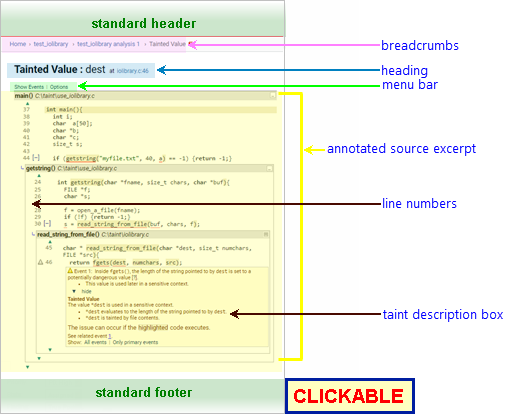
See CodeSonar GUI Reference: Standard Header. The highlight legend is available.
Home > [Other_ProjectTree_Ancestors >] Project_Name > Analysis_Name > Tainted Value
| Home | Links to the GUI Home page. |
|---|---|
| Other_ProjectTree_Ancestors | Together with the Home link (corresponding to the root project tree), represents the project tree ancestors of the analyzed project as a >-separated sequence of project tree names. Each name links to the corresponding Project Tree page. |
| Project_Name | Links to the GUI Project page for Project_Name, which is the project that was analyzed. |
| Analysis_Name | Links to the GUI Analysis page for Analysis_Name. |
Tainted Value: token_name at File_Name:line_num
where:
The menu bar provides two menus: Show Events and Options.
| Show Events Menu |
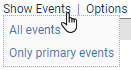
Select an item from this menu to expand the specified set of annotations (and hide all others).
|
|---|---|
| Options Menu |
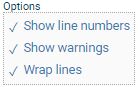
The options are as follows.
With the exception of Show warnings, CodeSonar will remember your settings and apply them to all source listings. If you are logged in, the settings will be associated with your username and will still be applied the next time you log in. Otherwise, they will be applied for the remainder of your user session. |
The annotated code excerpt shows the propagation of taint along a particular path. CodeSonar provides additional information to explain the events along the path and aid in diagnosis:
| Path Name | Provided at the top of the excerpt. Click to navigate to the Source Listing for the file. |
|---|---|
| Line Numbers | Correspond directly to line numbers in the file. Visibility is controlled by Show line numbers in the Options menu. |
| Explanation Information |
Significant locations in the excerpt are annotated.
|
| Source Coloring and Interaction | The code excerpt includes standard source coloring and hyperlinking. Along with syntax coloring, the source excerpt has highlighting to identify the code on the taint propagation path of interest. |
| Information Window | The Information Window is available and will interact with any function, variable, macro, or type name in the source excerpt. |
See CodeSonar GUI Reference: Standard Footer.
Tainted Value pages have five kinds of annotation, described in the following table.
| Taint Description | Every Tainted Value page has a Taint Description box at the
location of interest. It summarizes
the taint phenomena described in the page, with links to the code
locations and annotations that are especially important. This annotation is analogous to the warning description box in a warning report. |
|---|---|
| Data | Describes the impact of a taint propagation event along the path of interest. Formatting and marking are as described in Warning Report Annotations: Data Annotation. |
| Control Flow | Describes the impact of a control flow along the path of interest. Formatting and marking are as described in Warning Report Annotations: Control Annotation. |
| Parse Error | If the file is associated with one or more parse errors, a
parse error annotation is displayed at each error
location. Parse error annotations are always displayed: they
cannot be hidden. |
| navigate within the code fragment | See Source Coloring and Hyperlinking. |
|---|---|
| view the full source listing for any file along the path | Click the file name where it appears in the annotated code excerpt. |