
JavaScript is not currently enabled, but is required for full CodeSonar manual search and browse functionality.
If you are viewing this file in your hub's Web GUI, enable JavaScript in your browser: you will also need it for GUI functionality.
If you opened this file directly from disk, your browser may be directly suppressing JavaScript functionality: certain browsers perform this suppression on local files (but not files delivered by web servers) for security reasons.
| CodeSonar® 9.0p0 Hot Tips | CONFIDENTIAL | CodeSecure Inc |
Configuration files contain a number of parameters that you can use to tune how CodeSonar works.
In many cases you will be able to use CodeSonar without modifying any of the default settings.
We also provide guidelines for Performing a More Thorough Analysis at the expense of time or other resources.
CodeSonar uses a set of configuration files to control aspects of the project build/analysis process. The following table summarizes the configuration file types.
| Configuration File | Location | Purpose |
|---|---|---|
| General Template | $CSONAR/codesonar/template.conf | Used for every project: loaded every time a compilation unit is built into the CodeSonar project, then again in the analysis phase. Also used to create new general project configuration files when necessary. |
| General Project |
projdir/P.conf |
Used for the project built and analyzed at projdir/P.prj: loaded every time a compilation unit is built into the CodeSonar project, then again in the analysis phase. If it doesn't exist when CodeSonar tries to load it, it is created by copying the general template and commenting out all content. |
| Default Presets |
$CSONAR/codesonar/default_presets/ |
Files with the extension .conf
located in $CSONAR/codesonar/default_presets/
are automatically processed immediately
after template.conf, as if you
had specified them using -conf-file. The files are processed in
lexicographical order of filename (as determined by
strcmp).
These files can be created manually or copied into the $CSONAR/codesonar/default_presets/ directory from $CSONAR/codesonar/presets/. The configuration tool also provides an interface for enabling certain popular presets to be used as default presets. Use the -no-default-presets command line option to run the build or analysis without invoking default presets. |
| Presets |
$CSONAR/codesonar/presets/PresetName.conf |
Configuration presets are applied to both the build phase and the analysis phase if applied by the user. |
| additional | Any location path/to/fname |
Used in the build phase and the analysis phase when -conf-file path/to/fname is specified.
There are no restrictions on fname: it can have any file extension, including no file extension at all. |
| Compiler Template |
$CSONAR/csurf/compiler_confs/C.A.L.S.conf
$CSONAR/csurf/compiler_confs/C.L.S.conf
for all supported compiler C, language L, target address size S combinations. CodeSonar does not ship with any compiler templates whose names include an ABI key A, but users can create such templates if they wish. |
Copied to create new project-compiler configuration files when necessary. |
| Project-Compiler |
projdir/P.C.L.S.conf
projdir/P.C.A.L.S.conf
for all compiler C, language L, target address size S combinations used in the project built and analyzed at projdir/P.prj. For compiler mappings (via COMPILER_MODELS) that include an ABI key, the corresponding project-compiler configuration file name will include the key A. |
Used in the build phase for the project built and analyzed at
projdir/P.prj:
loaded every time a compilation unit with that
compiler/language/size is built into the CodeSonar project. If
it doesn't exist when CodeSonar tries to load it, it is
created by copying a compiler
configuration file template. The loading and creation are
resolved as follows.
|
Suppose we are building and analyzing a project called P. Then configuration files are loaded as shown in the following diagram.
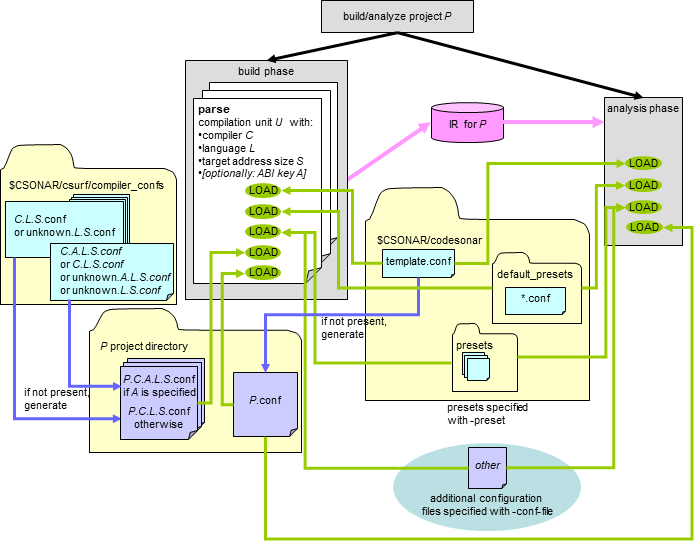
| Build Phase |
For each compilation unit U it recognizes
in the observed command, CodeSonar loads configuration
files in the following order before building U into the
CodeSonar project.
|
|---|---|
| Analysis Phase |
The analysis phase loads configuration files in the following
order.
|
All configuration files contain internal documentation covering file format, usage guidelines, and the parameters used in the files.
The documentation for individual parameters has been incorporated into this manual:
Note that there is no point in adding settings for analysis-related parameters (such as WARNING_FILTER) to a compiler template or project-compiler configuration file, since these configuration files are not loaded by the analysis phase.
Any configuration file can be edited directly in your text editor: the configuration file header contains a thorough explanation of the file format and usage guidelines. In addition, you can edit the general project configuration file by clicking the Configuration File "Change..." button in the second screen of the Windows Build Wizard.
| If you edit... | ..it will affect... |
|---|---|
| general template $CSONAR/codesonar/template.conf |
Future builds/analyses of all projects. and All subsequently-generated general project configuration files P.conf. |
general project configuration
file
projdir/P.conf |
Future builds/analyses of projdir/P.prj. |
compiler configuration file
templates
$CSONAR/csurf/compiler_confs/C.L.S.confor $CSONAR/csurf/compiler_confs/C.A.L.S.conf |
All subsequently-generated project-compiler configuration files for which the template is the highest-priority available candidate (see above for a description of the template selection mechanism). |
project-compiler configuration
file
projdir/P.C.L.S.conf |
For future builds of projdir/P.prj: any compilations with compiler C, language L, and target size S, where there is no COMPILER_MODELS rule associating an ABI key with the compiler. |
project-compiler configuration
file
projdir/P.C.A.L.S.conf |
For future builds of projdir/P.prj: any compilations with compiler C, language L, and target size S, where ABI key A is associated with the compiler through a COMPILER_MODELS rule. |
preset$CSONAR/codesonar/presets/PresetName.conf |
For any project, any future build/analysis to which the PresetName preset is applied. |
| additional configuration file Any location path/to/fname |
For any project, any future build/analysis for which -conf-file path/to/fname is specified. |
Use the codesonar create-conf command to create new project configuration files or revert existing ones to their initial state.
This command creates a new general project configuration file for pfilesname by copying the general template to a file called pfilesname.conf in your working directory, commenting out all content.
If compilername is specified, it also creates new project-compiler configuration files by copying all compiler configuration file templates with names of the form compilername.L.S.conf to the corresponding pfilesname.compilername.L.S.conf.
To update your configuration files when you upgrade CodeSonar, see Upgrading Configuration Files.
If a configuration file defines a parameter that has already been defined (in a previously-read file or earlier in the current file), CodeSonar processes it as follows.
You can change a parameter setting in multiple ways.
Between two base analyses of the same project. You can change all parameter settings.
Between incremental parent and incremental child analyses. You can change most parameter settings. Parameters whose settings should not be changed for incremental analyses are tagged as such in documentation and listed in the configuration parameter index.
Between two codesonar
build invocations, or between codesonar build and codesonar analyze. You may need to
change settings for compiler-dependent
configuration file parameters, and for compiler-independent
parameters that affect parsing: for example, you may need to change
CFLAGS_APPEND/CFLAGS_PREPEND settings to specify different
-D or -I flags, or adjust various parallelism settings
to account for changes in machine availability. However, do not
change settings for parameters that control information used by the
analysis phase. Parameters whose settings should not be changed
between stages of a single build/analysis are tagged as such in
documentation and listed in
the configuration parameter index.
If you are using any of the presets
shipped with CodeSonar, do not change the set of presets or the
order in which they are specified. This includes default presets as
well as presets explicitly included with -preset or loaded as extra configuration
files with -conf-file.
You can define and use your own variables in configuration files. For example:
set MYVAR = aou
set MYVAR_PLUS = ${MYVAR}ee

# replaces aou with aouee in source code
SOURCE_PATTERN = s/${MYVAR}/${MYVAR_PLUS}/

set MYVAR += eeiou
# replaces aoueeiou with aouee in source code
SOURCE_PATTERN = s/${MYVAR}/${MYVAR_PLUS}/
Less-elegant uses of these variables are also possible. For example, consider the effect of changing the definition of TOGGLE from <nothing> to # in the following:
set TOGGLE =
${TOGGLE} SOURCE_PATTERN = s/abc/def/
${TOGGLE} SOURCE_PATTERN = s/efg/xyz/
The following sections contain further information about configuration files.
| Upgrading Configuration Files | Describes how to update your configuration files when you upgrade CodeSonar |
| Index: Compiler-Independent Configuration File Parameters | An alphabetical list of the parameters in the general template and general project configuration files. |
| Compiler-Independent Configuration File Parameters | Full documentation for every parameter in the general template, in order of appearance. |
| Index: Compiler-Dependent Configuration File Parameters | An alphabetical list of the parameters in the compiler template and project-compiler configuration files. |
| Compiler-Dependent Configuration File Parameters | Full documentation for every parameter in a compiler template, in order of appearance. |