

JavaScript is not currently enabled, but is required for full CodeSonar manual search and browse functionality.
If you are viewing this file in your hub's Web GUI, enable JavaScript in your browser: you will also need it for GUI functionality.
If you opened this file directly from disk, your browser may be directly suppressing JavaScript functionality: certain browsers perform this suppression on local files (but not files delivered by web servers) for security reasons.
| CodeSonar® 9.0p0 Hot Tips | CONFIDENTIAL | CodeSecure Inc |
The CodeSonar SARIF Importer loads warning information from a file in Static Analysis Results Interchange Format (SARIF) and adds those warnings to the set of analysis results recorded on the hub.
This can be used to view results from other static analysis tools, such as the Clang Static Analyzer (CSA), in CodeSonar.
Windows Note: Some Windows users have reported that they cannot run the scan-build command and obtain SARIF output even independently of CodeSonar. If you are a Windows user having difficulties completing the analysis steps below and the general troubleshooting advice does not help you resolve them, you may need to file a Clang Static Analyzer bug report.
When working with CodeSonar in conjunction with the Clang Static Analyzer, a typical workflow is to either use an IDE like Apple's Xcode®, or a command line tool like scan-build to execute the Clang Static Analyzer while CodeSonar observes the build. The Clang Static Analyzer provides static analysis capabilities and executes the host compiler to perform an actual build of the source code. When executing the Clang Static Analyzer, you must specify that it output its results to the SARIF format (.sarif) so that these results may be imported into your project.
CodeSonar can load warning information from SARIF files and add those warnings to the set of analysis results recorded on the hub. The warnings can then be browsed alongside any warnings reported by CodeSonar.
Important: SARIF exports are supported in Clang Static Analyzer v8.0 and later. If a suitable version of Clang Static Analyzer is not already available on your local system, you will need to install and configure it to use the features described in this page.
In this section (and throughout this manual), $CSONAR indicates the CodeSonar installation directory.
The following diagram provides an overview of a CodeSonar C/C++ build/analysis process based on Clang Static Analyzer results.
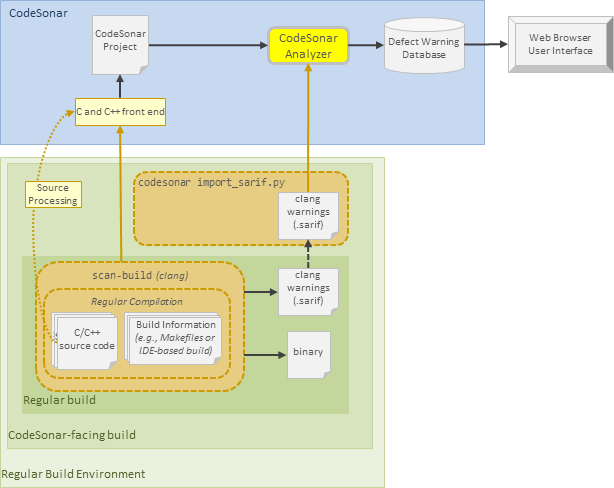
To build and analyze a C/C++ project based on the invocation of the Clang Static Analyzer scan-build command, do the following.
The following diagram provides an overview of importing Objective-C analysis results into CodeSonar.
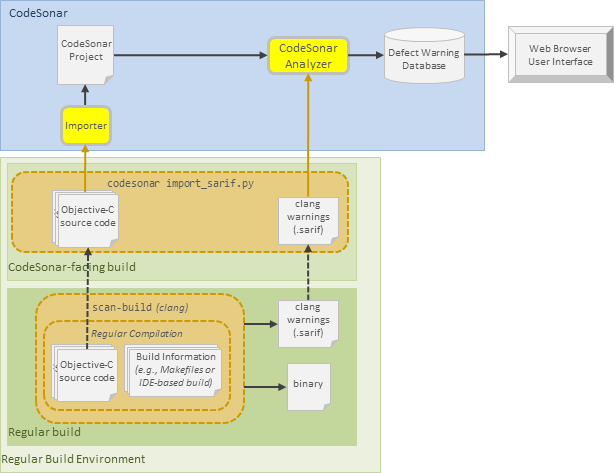
This section assumes that /path/to/clang/bin/ is in the PATH. To import CSA results into a CodeSonar project called ExampleTest, do the following.
The following command lines display methods for importing results produced by the Clang Static Analyzer into CodeSonar.
This section assumes that /path/to/clang/bin/ is in the PATH.
Build and analyze a CodeSonar project based on the invocation of the Clang Static Analyzer.
Exactly the same as Example 1, except that the SARIF output from Clang Static Analyzer is imported in a separate codesonar build invocation before the project is finalized and analyzed.
Observe the compilation of file1.c and file2.c and load their respective Clang analysis results from the directories reported in the Clang Static Analyzer output.
Analyze Objective-C source file scratch.m with the Clang Static Analyzer, then import both the source file and the analysis results into a CodeSonar project.
If the corresponding Analysis page on your hub is not showing any results from the Clang Static Analyzer, check the following.
The CodeSonar integration requires Clang Static Analyzer v8.0 or later.
Double-check to make sure your codesonar analyze command line contains all the required elements.
In particular, make sure you have specified the correct path to the directory where scan-build wrote its SARIF files. This will be different every time you run scan-build.
An illustrated usage example for using the CodeSonar SARIF importer to incorporate results found by the Clang Static Analyzer is provided in section SARIF Importer for CodeSonar Using the Clang Static Analyzer: Example.