- Control Panel / Administrative Tools / Services
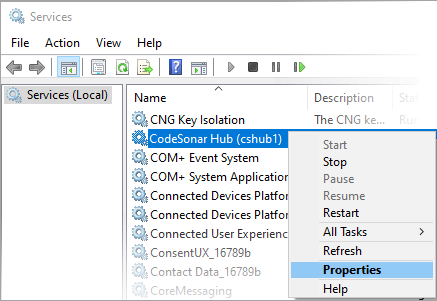
A properties dialog for the hub service will open.
JavaScript is not currently enabled, but is required for full CodeSonar manual search and browse functionality.
If you are viewing this file in your hub's Web GUI, enable JavaScript in your browser: you will also need it for GUI functionality.
If you opened this file directly from disk, your browser may be directly suppressing JavaScript functionality: certain browsers perform this suppression on local files (but not files delivered by web servers) for security reasons.
| CodeSonar® 9.0p0 Hot Tips | CONFIDENTIAL | CodeSecure Inc |
On Windows systems, by default, the CodeSonar hub runs as a service "owned" by the user who originally created the hub.
This page provides instructions for switching ownership to the local system account (SYSTEM).
On Windows systems, by default, the CodeSonar hub runs as a service "owned" by the user who originally created the hub.
In some cases you may prefer that the service belongs to the local system acount (SYSTEM) rather than a particular user. In particular, the local system account does not need to run with a given username and password. This means that if the hub creator leaves the company, or their password changes, no changes to the hub are required. It also means that the hub can be administered by anyone with administrator rights on the system.
Note that there are also downsides to this approach.
This page provides instructions for switching ownership of the CodeSonar hub service to the SYSTEM account. There are two main parts to this process.
In order to run the hub service, the SYSTEM account will need full permissions on the hub directory. To make sure it has these permissions, do the following.
Once you have ensured that the SYSTEM account has full control over the hub directory, you can make it the "owner" of the hub service.
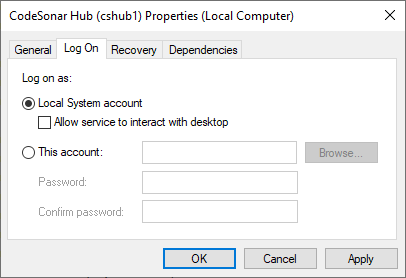
A properties dialog for the hub service will open.
The hub service will now run under the local system account (SYSTEM).