If you were interested in the root project tree, you don't need to navigate further. Otherwise, go on to the next step.
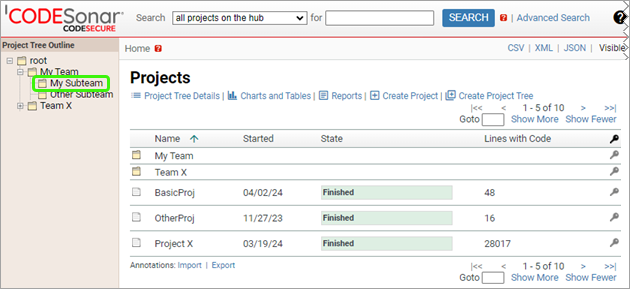
The corresponding Project Tree page will open.
JavaScript is not currently enabled, but is required for full CodeSonar manual search and browse functionality.
If you are viewing this file in your hub's Web GUI, enable JavaScript in your browser: you will also need it for GUI functionality.
If you opened this file directly from disk, your browser may be directly suppressing JavaScript functionality: certain browsers perform this suppression on local files (but not files delivered by web servers) for security reasons.
| CodeSonar® 9.0p0 Hot Tips | CONFIDENTIAL | CodeSecure Inc |
Every project tree on the hub has its own Project Tree page in the CodeSonar Web GUI.
In most cases, the most interesting information on this page will be the list of project and project tree children of the project tree. However, the page also lists the user-specified project description (if any) and the time at which the project was created, and provides functionality for operating on the project and project tree children: deleting, moving, and creating new ones.
In order to view a project tree page, you will need PTREE_READ permission for the project tree of interest.
The functionality available on the page, and the projects and project trees displayed in the table of children, depend on various further permissions. For a full list, see GUI Reference: Home; Project Tree.
The general information about a project tree is located on the
Project Tree page.
Information about the hub's root project
tree is also presented on the Home page.
If you know the PTree ID, you can navigate directly to the page via the URL /projecttree/ptree_id.html. Otherwise: