JavaScript is not currently enabled, but is required for full CodeSonar manual search and browse functionality.
If you are viewing this file in your hub's Web GUI, enable JavaScript in your browser: you will also need it for GUI functionality.
If you opened this file directly from disk, your browser may be directly suppressing JavaScript functionality: certain browsers perform this suppression on local files (but not files delivered by web servers) for security reasons.
| CodeSonar® 9.0p0 Hot Tips | CONFIDENTIAL | CodeSecure Inc |
Viewing every warning in the hub database provides a complete history of the analyses stored on the hub, and allows you to ensure that no warnings have escaped notice.
The easiest way to view every warning is to search with an empty search field, as described below.
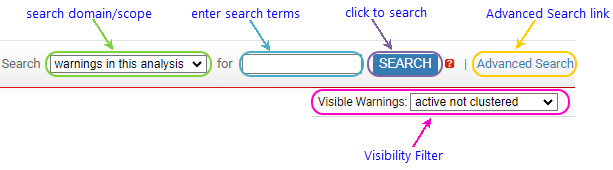
Search functionality can always be accessed through the search widget that appears on every page in the CodeSonar GUI. The following annotated screenshot fragment shows the different parts of the search widget.
CodeSonar will open a Warning Search Results page with a table listing the representative instances of all warnings on the hub. In most cases the set of representative instances is the most useful.
If you want to see every instance of every warning on the hub, use warning search language expression similar:true.
CodeSonar will open a Warning Search Results page with a table listing all instances of all warnings on the hub.