Task: Show Warnings That First Emerged After a Specified Analysis

Sometimes it is useful to see all the warnings that have emerged since a particular point in the project's history.


Method

  1. Start the hub, if it is not already running.
  2. Determine the analysis ID of the analysis you want to compare against.
    1. List the analyses for the project you are interested in.
    2. Click the Analysis table heading to show a table menu, then select Show > Analysis ID to add the Analysis ID column to the table.
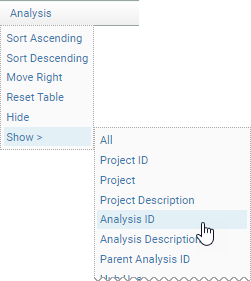
      screenshot fragment: adding the Analysis ID column to a table of analyses

    3. Note the ID of the analysis you are interested in. Call this comp_id.
  3. Construct the search string:
    aid>comp_id new_warning=true
  4. Paste the search string into the search field, select warnings in all projects from the search domain/scope menu, and click Search.

    A search results page will open.

  5. Select all from the Visible Warnings menu.

    The search results page now displays all the new warnings since the analysis with comp_id.

  6. If you want to be able to access this search from the Visible Warnings menu in future, save it as a named search.

Extensions

You may also wish to do one or more of the following.

Links

Related tasks

Using CodeSonar