
JavaScript is not currently enabled, but is required for full CodeSonar manual search and browse functionality.
If you are viewing this file in your hub's Web GUI, enable JavaScript in your browser: you will also need it for GUI functionality.
If you opened this file directly from disk, your browser may be directly suppressing JavaScript functionality: certain browsers perform this suppression on local files (but not files delivered by web servers) for security reasons.
| CodeSonar® 9.0p0 Hot Tips | CONFIDENTIAL | CodeSecure Inc |
This section describes the components and behavior of a warning processor.
Every warning processor must accept the following commands: install, begin, commit, rollback, retry, and abort. Processors that are to be installed in Automatic mode must also accept the analysis_transition command. Command details are provided below.
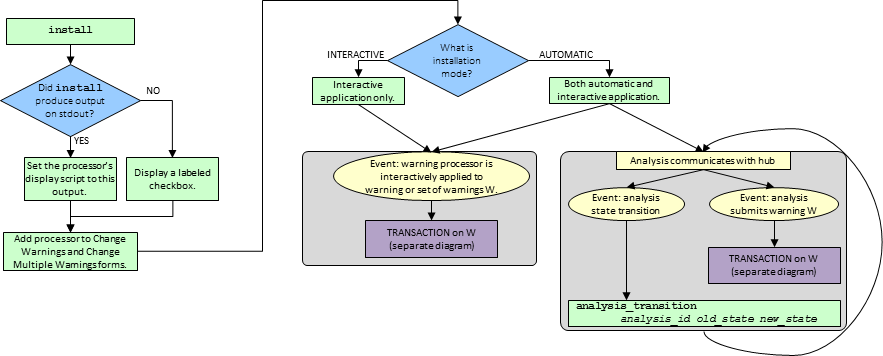
The life cycle of a warning processor then proceeds as follows.
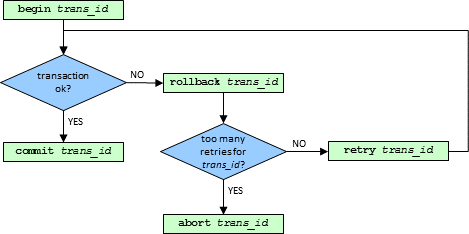
Processor application to a warning or set of warnings takes place in a transaction constructed from begin, commit, rollback, retry, and abort.
The transaction uses the two-phase commit protocol (for details, see Wikipedia: Two-phase commit protocol).
| Warning Processor Command | Two-Phase Commit Protocol Phase |
|---|---|
| begin / retry | Phase 1. The command return code (process exit code) determines the yes/no vote submitted by the processor session. |
| commit | Phase 2 (success). |
| rollback | Phase 2 (failure). |
| abort | none |
A warning processor installed on the hub has the following basic properties.
| Installation Mode |
Each warning processor is installed in one of two modes:
Automatic or Interactive. The installation mode controls the
set of available application
modes:
|
||||||
|---|---|---|---|---|---|---|---|
| Display Script |
If the install
command produces output on stdout, the hub will record this
output as the warning processor's display script.
For implementation guidelines, see Authoring Warning Processors: Display Scripts. |
||||||
| Label | The user specifies a label for each warning processor at installation time. This label is used to identify the processor in the Web GUI. | ||||||
| Executable | The executable that the hub will run when it invokes the warning processor. | ||||||
| ID | A unique numerical identifier for the processor. |
Every warning processor must accept the following commands: install, begin, commit, rollback, retry, and abort. Processors that are to be installed in Automatic mode must also accept the analysis_transition command.
| Command | Invoked | Requirements and Notes |
|---|---|---|
| install | When the processor is installed on the hub. | If the install command writes any output to stdout, the CodeSonar hub will consider this to be the warning processor's display script. |
| analysis_transition analysis_id old_state new_state | When the analysis transitions to a new state. | Can only be invoked during automatic application (that is, only if the warning processor is installed in Automatic mode). |
| begin trans_id | Every time the warning processor is applied to a warning or set of warnings. | The hub will write an XML document to stdin; the warning processor should process this, and emit any changes to the warnings as an XML document on stdout. Returns 0 on success and non-0 on failure. |
| commit trans_id | If the transaction succeeds | The warning processor should use this invocation to perform any necessary bookkeeping tasks. The hub will not write anything to stdin, and the processor should not write anything to stdout. |
| rollback trans_id | If the transaction fails. |
There are a number of reasons that a transaction may fail: some
examples are power outage, hub database deadlock, or failure of
this or another warning processor.
If the transaction fails because because of hub database issues (such as deadlock, or a race condition between two warning processors), no changes are applied to any warnings. The hub will invoke rollback trans_id, then invoke either retry trans_id or abort trans_id, depending on how many times the transaction has already been tried. The warning processor should use this invocation to perform any necessary bookkeeping tasks. The hub will not write anything to stdin, and the processor should not write anything to stdout. Note that if errors occur because of problems such as power loss, there will be no opportunity to apply the rollback command. |
| retry trans_id | After rollback trans_id, if the transaction hasn't previously failed too many times. | The hub will write an XML document to stdin; the warning processor should process this, and emit any changes to the warnings as an XML document on stdout. Returns 0 on success and non-0 on failure. In many cases retry functionality will be identical to that for begin. |
| abort trans_id | After rollback trans_id, if the transaction has previously failed too many times. | If the warning processor transaction fails too many times, the transaction will abort. The hub will not write anything to stdin, and the processor should not write anything to stdout. |
The following sections contain further information about warning processors.
| Warning Processors Shipped With CodeSonar | Describes the example warning processors and explains how to customize and install them. |
|---|---|
| Warning Processor Input and Output | Describes the formats and semantics of warning processor inputs and outputs. |
| Authoring Warning Processors | Outlines the requirements for creating a CodeSonar warning processor. |
| Authoring Python Warning Processors | Explains how to use the csonar_utils Python package to create custom warning processors. |
| csonar_utils API documentation | Describes the key components of the csonar_utils Python package. |