JavaScript is not currently enabled, but is required for full CodeSonar manual search and browse functionality.
If you are viewing this file in your hub's Web GUI, enable JavaScript in your browser: you will also need it for GUI functionality.
If you opened this file directly from disk, your browser may be directly suppressing JavaScript functionality: certain browsers perform this suppression on local files (but not files delivered by web servers) for security reasons.
| CodeSonar® 9.0p0 Hot Tips | CONFIDENTIAL | CodeSecure Inc |
This section provides an overview of the steps undertaken by CodeSonar when a user builds and analyzes a project.
If you are looking for information about how to build and analyze a CodeSonar project, see Building and Analyzing a CodeSonar Project.
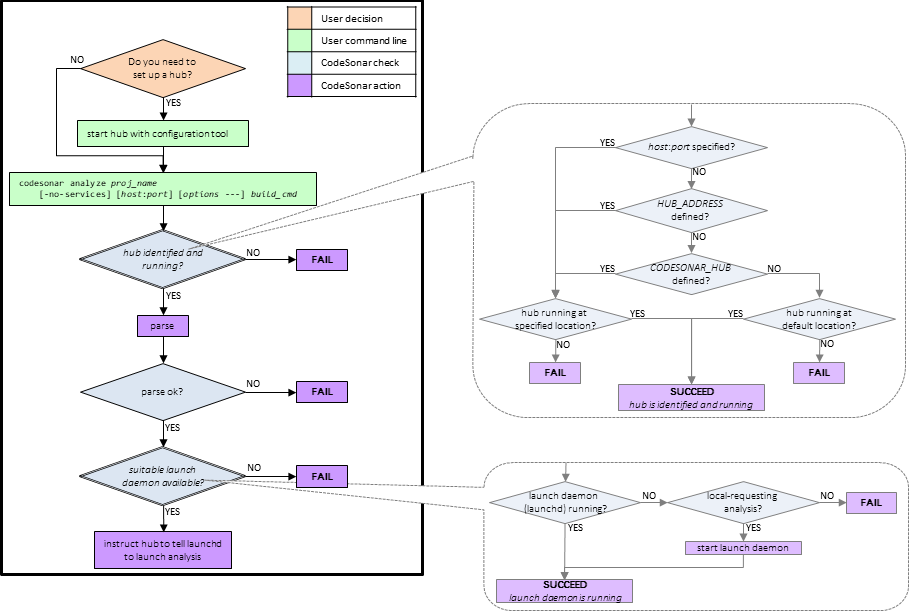
The flowchart below shows the major steps involved in the CodeSonar project build and analysis.
There are three main phases.
| Phase 1: User Initiates Build |
The user issues a build command. At minimum, this includes a
name for the CodeSonar project and the command that
would usually be used to build the underlying software project.
It may also include a hub location and additional build
options.
The hub must already be running before the analysis can be executed. For full details, see The CodeSonar Hub. |
|---|---|
| Phase 2: Daemons Checked | CodeSonar looks for a hub at the location specified in the build command. If no location is specified, CodeSonar looks in the default location (as specified by — in order of precedence — the HUB_ADDRESS configuration file option, the CODESONAR_HUB environment variable, or the factory default). It then looks for a launch daemon, and starts one if one is not already running. |
| Phase 3: Project Built and Analyzed | With the setup complete, CodeSonar builds the project as specified by the build command, analyzes it, and stores the results on the hub. |
| hub | A web server that manages CodeSonar analysis results. |
|---|---|
| launch daemon | A process that initiates CodeSonar operations on behalf of the hub. |