
JavaScript is not currently enabled, but is required for full CodeSonar manual search and browse functionality.
If you are viewing this file in your hub's Web GUI, enable JavaScript in your browser: you will also need it for GUI functionality.
If you opened this file directly from disk, your browser may be directly suppressing JavaScript functionality: certain browsers perform this suppression on local files (but not files delivered by web servers) for security reasons.
| CodeSonar® 9.0p0 Hot Tips | CONFIDENTIAL | CodeSecure Inc |
To use CodeSonar, you need a hub: a web server that manages CodeSonar analysis results.
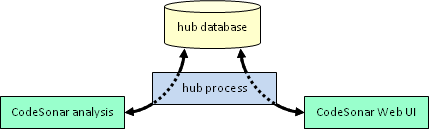
The CodeSonar analysis and the hub can run on different machines. This allows multiple users to easily share a single hub. Every hub is associated with a specific network location (host and port) and with a hub database.
| location | The hub location is established when the hub is started; further interactions with the same hub must specify a compatible interface. For example, if you were on a machine with address 2001:db8::abcd and started a hub at [::1]:7340, you would not be able to access that hub through [2001:db8::abcd]:7340. |
|---|---|
| database |
The hub database stores
analysis results.
|
The following sections describe how to use and manage a CodeSonar hub.
| Hub Location | Choosing a location for your hub; checking whether a hub is running at a specified location; how CodeSonar determines hub locations associated with commands. |
| Starting A Hub | Starting a hub with codesonar hub-start. |
| Shutting Down A Hub | Shutting down a running hub from the command line, from the Web GUI, or by using standard Windows controls. |
| Moving A Hub | Changing the host or port on which the hub listens; relocating the hub directory within your file system. |
| Satellite Hubs | Creating and using satellite hubs. |
| Hub Process | The hub process: cshub[.exe]. |
| Hub Directory and Database | The location and purpose of the hub directory and database. |
| Getting Hub Information | The available methods for obtaining general information about a running hub. |
| GUI: Settings | View and modify hub settings. |