Satellite Hubs
Every CodeSonar hub is either a primary hub or a
satellite hub. This section describes the properties of
satellite hubs and provides directions for using them.
Note: satellite hubs can only be set up by the Administrator account (it is not sufficient to
use another account with the Administrator role), and can only be attached
to primary hubs that are using the database shipped with
CodeSonar.
Every CodeSonar hub is either a primary hub or a
satellite hub:
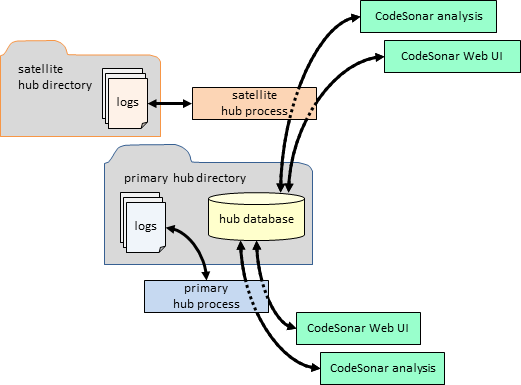
Satellite hubs are useful for distributing hub load across
multiple computers. The hub database (PostgreSQL) still runs
exclusively on the primary hub machine, but the web server processes
(cshub) can be spread across arbitrarily many machines.
Follow these instructions to set up a satellite hub, including
configuring the associated primary hub to accept satellite
connections.
-
Identify the primary hub you
want to use.
- Determine the location and
hub directory of the primary
hub.
We will refer to these as primhost:primport and
hubdir, respectively.
-
Decide where you want to run the satellite hub.
Note that even though the satellite hub uses the hub database
belonging to the primary hub, it still has its own hub directory.
The satellite hub directory is used primarily for storing
configuration information.
- Select a suitable location
and hub directory for the
satellite hub.
We will refer to these as sathost:satport and
sat_dir, respectively.
In some cases a user might not be permitted to run software
that listens on any port. In such cases, an administrator will
need to start the hub.
Low network latency between the primary and satellite hubs is
more important to overall performance than low network latency
between a (primary or satellite) hub and an HTTP hub client (such
as a web browser accessing the CodeSonar Web GUI, or the CodeSonar build/analysis). If you have a
choice between putting a slow connection between primary and
satellite hub, and putting it between a hub and an HTTP client,
the latter is better.
- Make sure you have credentials for a primary hub account for
a primary hub user account with G_HUB_INFO permission.
These credentials are used to authenticate the early stages of the
satellite hub-start process. You
can use Administrator credentials,
since you will need to know them anyway (see the next step), but in
some cases you will be able to use a less-privileged user
account.
- Make sure you have the password for the Administrator account on the primary
hub.
You must provide this in order to authorize the database operations
involved in starting satellite hub.
(Note in particular that it is not sufficient to use another
account with the Administrator
role.)
-
Is the primary hub running?
-
Issue the hub-start command for the satellite hub.
(Full details of the command line for starting a satellite hub
are provided below.)
- When prompted, provide the Administrator password for the primary
hub.
-
If prompted to do so, copy the primary hub's TLS
certificates and keys to the satellite hub directory.
You will only be prompted to do this if the primary hub is
configured to use TLS for
database communication. Otherwise, you can skip this step.
- Copy the following files to sat_dir/:
- hubdir/client.crt
- hubdir/client.key
- hubdir/root.crt
- Set access permissions on the copies so that the files are
only read/writable by their owner, and are not executable by
any user.
-
Wait for the hub-start
command to finish.
- If User Account Control is enabled, your system may
request permission for CodeSonar to start a hub.
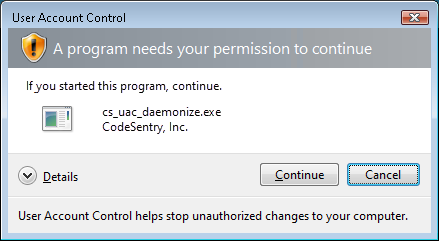
Click Continue to proceed.
- If the codesonar
hub-start command appears to be taking a long time to
finish, it may be waiting for services authentication. (If
you are working in other windows while running CodeSonar
those windows might be obscuring the authentication dialog:
if you don't see a dialog, move the other windows to
check underneath). See CodeSonar as a Windows
Service for more information.
-
Restart the primary hub and all its satellites.
- Stop the newly-created satellite hub and any other
satellites of the primary hub.
codesonar hub-stop sathost:satport
- Stop and restart the primary hub.
codesonar hub-stop primhost:primport
codesonar hub-start [-no-services]
hubdirprimhost:primport
- Restart the newly created satellite hub and any other
satellites of the primary hub.
codesonar hub-start [-no-services]
[-auth authtype] [-hubuser username] [-hubpwfile pwfile] [-hubbearerfile bearerfile] [-hubcert certfile] [-hubkey privatekeyfile]
-satellite-of
[protocol://]primhost:primport
sat_dir sathost:satport
- Use the authorization options to provide credentials
for a primary hub user account with G_HUB_INFO permission. These
credentials are used to authenticate the early stages of
the satellite hub-start
process.
- When prompted, enter the primary hub's Administrator password. This is used
to authenticate the database operations involved in
starting a satellite hub.
- Use the satellite hub.
You will now be able to connect to the satellite hub at
http://sathost:satport.
To determine whether or not a particular hub is a satellite, check
the Satellite field in the hub information.
- Satellite:True
indicates a satellite hub.
- Satellite:False
indicates a primary hub.
The general form of the command line for starting a satellite hub
is shown below. This command must be run on the satellite hub
machine.
codesonar hub-start [-no-services]
[-auth authtype] [-hubuser username] [-hubpwfile pwfile] [-hubbearerfile bearerfile] [-hubcert certfile] [-hubkey privatekeyfile]
-satellite-of
[protocol://]primhost:primport
sat_dir sathost:satport
Where
| -no-services
|
(Windows only) specifies that the hub should not be run as a
service (see section CodeSonar as a
Windows Service for more information). |
[-auth authtype],
[-hubuser username],
[-hubpwfile pwfile],
[-hubbearerfile bearerfile],
[-hubcert certfile],
[-hubkey privatekeyfile]
|
Specify how CodeSonar should attempt to authenticate this
command. For details, see Hub
Authentication: Authenticated codesonar Subcommands.
Use these options to provide credentials for a primary hub
user account with G_HUB_INFO permission. |
| [protocol://]primhost:primport
|
is the location of the primary
hub with which the satellite will be associated.
- If protocol:// is
specified, CodeSonar will only try the specified URL. In
particular, if http:// is
specified then CodeSonar will not try the equivalent
https:// URL even if
directed to do so by the hub.
- If protocol:// is
not specified, CodeSonar will try http:// first, then redirect to the
equivalent https:// URL if
directed to do so by the hub.
|
| sat_dir
|
is the path to the hub
directory for the satellite hub.
- If sat_dir does not already exist, CodeSonar will
create it and populate it with the appropriate files.
- If sat_dir exists and is empty, CodeSonar will
populate it with the appropriate files.
- If sat_dir exists and is nonempty, it must contain
appropriate hub files (from a previous invocation of
codesonar hub-start). In
this case, the hub will be started with the settings that are
already stored in sat_dir.
- If the appropriate files are not present, the
hub-start command will
fail.
- If sat_dir was previously the hub directory
for a primary hub, the hub-start command will fail.
|
| sathost:satport
|
is the location of the satellite hub. |
Shutting down a satellite hub is accomplished in the same ways as
shutting down a primary hub. For details, see Shutting Down A Hub.
Note also that a satellite hub will automatically shut down if its
associated primary hub is shut down.
I am getting "out of connections" errors.
