
JavaScript is not currently enabled, but is required for full CodeSonar manual search and browse functionality.
If you are viewing this file in your hub's Web GUI, enable JavaScript in your browser: you will also need it for GUI functionality.
If you opened this file directly from disk, your browser may be directly suppressing JavaScript functionality: certain browsers perform this suppression on local files (but not files delivered by web servers) for security reasons.
| CodeSonar® 9.0p0 Hot Tips | CONFIDENTIAL | CodeSecure Inc |
Incrementality allows projects to be updated and re-analyzed based on incremental builds of the underlying software project. This section summarizes the features and consequences of incrementality.
Incrementality is currently supported for C/C++ analysis only.
Large software projects do not typically undergo a full rebuild every time there is a change to the codebase. In many cases, there will instead be an incremental build, in which only the parts of the project affected by the changes are recompiled and relinked.
CodeSonar's incremental build/analysis is analogous: only those parts of the CodeSonar project affected by changes in the codebase are rebuilt and re-analyzed. This can offer substantial time savings when analyzing large projects.
Suppose a user has an underlying software project S and a CodeSonar project P that was generated by performing the CodeSonar build/analysis on S. Then an incremental build/analysis of P works as follows.
The following diagram provides an overview of the process.
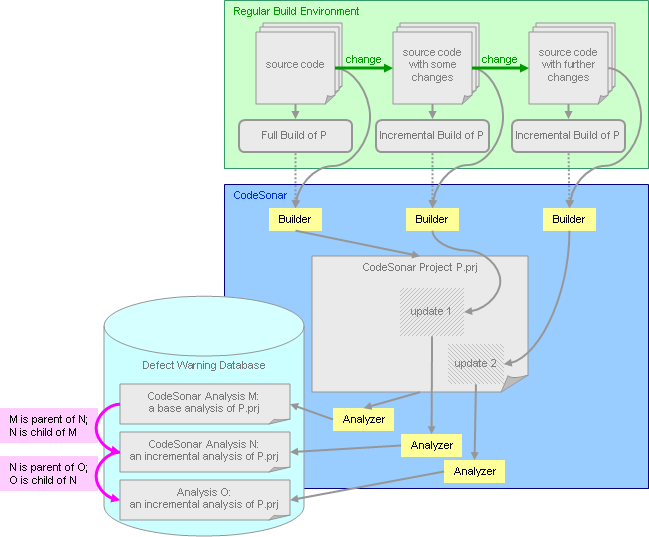
Remote-managed analysis note: remote-managed analyses currently re-analyze the entire project, rather than only those parts affected by the changes. Full support for incremental, remote-managed analysis will be added in a future release.
Set INCREMENTAL_BUILD=Yes to enable CodeSonar's incrementality features for a build/analysis and its descendants.
There are three possibilities when we analyze a project P with INCREMENTAL_BUILD=Yes.
Note that in order for CodeSonar results to accurately reflect the changes in a given build directory, the CodeSonar analysis must be applied to every build that takes place there.
Suppose we have an incremental analysis A whose parent analysis is B. Then the warnings issued by A are determined as follows.
| warning instances associated with A | = | new instances of (warnings issued by B − warnings from B retracted by A) |
| + new warnings issued by A |
We use the following terminology in discussion of incrementality.
| base analysis | An analysis that is based on a full rebuild of the underlying software project. A base analysis has no parent analysis. |
|---|---|
| incremental analysis | An analysis that only covers changes to the source code (and the effects of those changes) since a specific prior analysis. |
| parent analysis | Every incremental analysis of a project P is carried out with respect to a specific parent analysis: the analysis with which P.prj_files/ was most recently associated. An incremental analysis has exactly one parent. |
| ancestor analysis | Analysis A is an ancestor of analysis B if A is the parent analysis of B or is an ancestor of the parent analysis of B. |
| child analysis | Analysis A is a child of analysis B if B is the parent analysis of A. An analysis can have arbitrarily many children: the incremental hierarchy for a project is a tree, not a list. You can make a branch in the tree at any time: see Task: Branch An Incremental Analysis for details. |
| descendant analysis | Analysis A is a descendant of analysis B if A is a child analysis of B or is a descendant of a child analysis of B. |
| retraction | An incremental analysis A will issue new instances of all warnings issued by its parent analysis B except those that A determines should be retracted. Retraction takes place during the drop traversal. Retracted warnings remain associated with B and any relevant ancestors of B, but are not associated with A unless A issues fresh instances of those warnings during the analysis traversals. |
Several kinds of pages in the CodeSonar Web GUI contain information pertaining to incrementality.
| Analysis page | There are two new rows in the basic analysis information table: |
|---|---|
| Project page | A Parent Analysis ID column is available in the analysis table. |
| All page types that show Analysis State | The border of the Analysis State progess bar is black for base analyses, gray for incremental analyses. The affected page kinds are Analysis, Home, Analysis Files, Analysis Log, Build Log, Native Compilation Details Log, Parse Log, Parse Details Log, Project, and Source Listing. |
The CodeSonar Plug-In API provides support for handling warning retraction.
| API Implementation | Providing Retraction Information |
|---|---|
| C++ | Optional warning_retraction_info argument to the various overloads of warningclass::report() and warningclass::report_return_warning(). |
| Python | Optional warning_retraction_info argument to the various overloads of warningclass::report() and warningclass::report_return_warning(). |
| C | cs_warning_retraction_info_t* argument to csonar_report_warning(), csonar_report_path_warning(), csonar_report_step_path_warning(), csonar_report_location_warning(), csonar_report_location_span_warning(), csonar_report_location_warning_in_pdg(), csonar_report_location_span_warning_in_pdg(), csonar_report_locations_warning(), csonar_report_locations_warning_in_pdg(), csonar_report_file_warning(). |
| API Implementation | Manual Warning Retraction Function |
|---|---|
| C++ | warning::retract() |
| Python | warning.retract() |
| C | csonar_retract_warning() |
Changes to CodeSonar configuration files are not sufficient to trigger re-analysis of the entire project, even if those changes would cause CodeSonar to produce different results.
Values for some configuration parameters cannot be changed between incremental analyses; some other parameters have constraints on the changes that can occur between incremental analyses. CodeSonar will issue an alert for any configuration value change that does not conform to these restrictions.
| Do not change: | |
|---|---|
| Do not decrease: |